Posts

akhir mera gum hi mere kaam aya

Mera gum hi to akhir mere kaam aaya, Roya aaj bhut tab khahi aaram aaya..! Chod chukka tha tabhi me jine k chahat, Chod k jab se tera gaon me is shahar me aaya..! Kho chuka tha kab ka is shahar me k achanak, Kisi k juban se aaj tera naam aaya..! Chupta hai ashiqe tujhe is jamane se, Jane kese meri har gazal me tera hi naam aaya..!!
what is ADO.net DataSet

Image
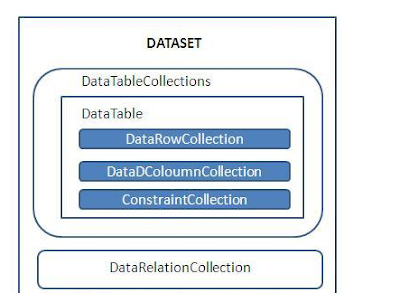
Hello Guys !                          many people have the problem that what is ado.net Dataset. so this bolg very help full for you... just read carefully...nd enjoy this blog..... :)  The ADO.NET  DataSet  contains DataTableCollection and their DataRelationCollection . It represents a collection of data retrieved from the Data Source. We can use Dataset in combination with  DataAdapter Class  . The DataSet object offers a disconnected data source architecture. The Dataset can work with the data without knowing the source of the data coming from. That is , the Dataset can work with a disconnected mode from its Data Source . It gives a better advantage over  DataReader  , because the DataReader is working only with the connection oriented Data Sources. The Dataset contains the copy of the data we requested. The Dataset contains more than one Table at a time. We can set up Data Relati...

Using button columns in gridview

Hello Guys.! i have faced a many problem with gridview when i was fresher nd want to learn about the gridview nd faced the problem in attached the different types of buttons. today m thinking abt that problem....so we'll make a program in which we'll add a different types of buttons... m sure it'll be a very interesting program....

Export to Excel Sheet

Image
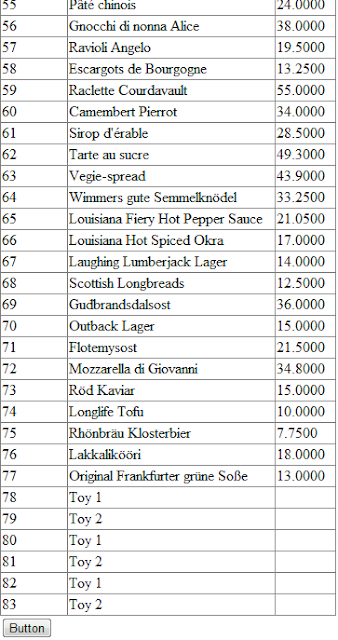
Hello Guys.\ ! Today we'll make a program that how to convert GridView data in Excel Sheet.. so......... just you have to make a GridView from your Toolbox along with a button.. nd just make it very easy code.  protected void Page_Load(object sender, EventArgs e)     {         if (!Page.IsPostBack)         {             BindData();         }     } //just make a connection with your database which table you want to use in your program.....     private void BindData()     {         string constr = @"Server=kishu-pc;Database=NORTHWIND;uid=sa; Password=pass@word1;";         string query = "SELECT ProductID, ProductName, UnitPrice FROM Products";         SqlDataAdapter da = new SqlDataAdapter(query, constr);         DataTable table = new DataTable(); ...

Formatting GridView

Image
Today i have just making a intersting thing. i made the funny view of gridview. let's start for making it ! first you have to select a grid view control from your toolbox. yup one more thing just download a northwind database. it'll be a very helpfull to you for doing any practice......  <asp:GridView ID="GridView1" runat="server" AutoGenerateColumns="False" BackColor="YellowGreen"             BorderColor="#336699" BorderStyle="Solid" BorderWidth="1px" CellPadding="2"             Font-Names="Verdana" Font-Size="10pt" Width="60%" DataKeyNames="ProductID"             GridLines="Horizontal">      <Columns>       <asp:BoundField DataField="ProductID" HeaderText="ProductID" />       <asp:BoundField DataField="ProductName" HeaderText="ProductName" />                   ...

How to use Repeater control

Image
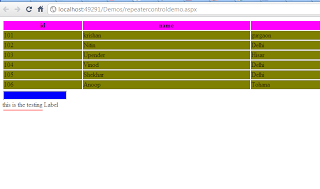
HI Guys ! Today ....... Use the Repeater control (sample) <%@ Page Language="C#" AutoEventWireup="true" CodeFile="repeatercontroldemo.aspx.cs"     Inherits="repeatercontroldemo" %> <!DOCTYPE html PUBLIC "-//W3C//DTD XHTML 1.0 Transitional//EN" "http://www.w3.org/TR/xhtml1/DTD/xhtml1-transitional.dtd"> <html xmlns="http://www.w3.org/1999/xhtml"> <head runat="server">     <title>Untitled Page</title> </head> <body>     <form id="form1" runat="server">     <div>         <asp:Repeater ID="Repeater1" runat="server" DataSourceID="SqlDataSource1">             <HeaderTemplate>                 <table width="100%">                     <tr style="background-color: Fuchsia "> ...

How to use Repeater control

Image
HI Guys ! Today ....... Use the Repeater control (sample) <%@ Page Language="C#" AutoEventWireup="true" CodeFile="repeatercontroldemo.aspx.cs"     Inherits="repeatercontroldemo" %> <!DOCTYPE html PUBLIC "-//W3C//DTD XHTML 1.0 Transitional//EN" "http://www.w3.org/TR/xhtml1/DTD/xhtml1-transitional.dtd"> <html xmlns="http://www.w3.org/1999/xhtml"> <head runat="server">     <title>Untitled Page</title> </head> <body>     <form id="form1" runat="server">     <div>         <asp:Repeater ID="Repeater1" runat="server" DataSourceID="SqlDataSource1">             <HeaderTemplate>                 <table width="100%">                     <tr style="background-color: Fuchsia "> ...